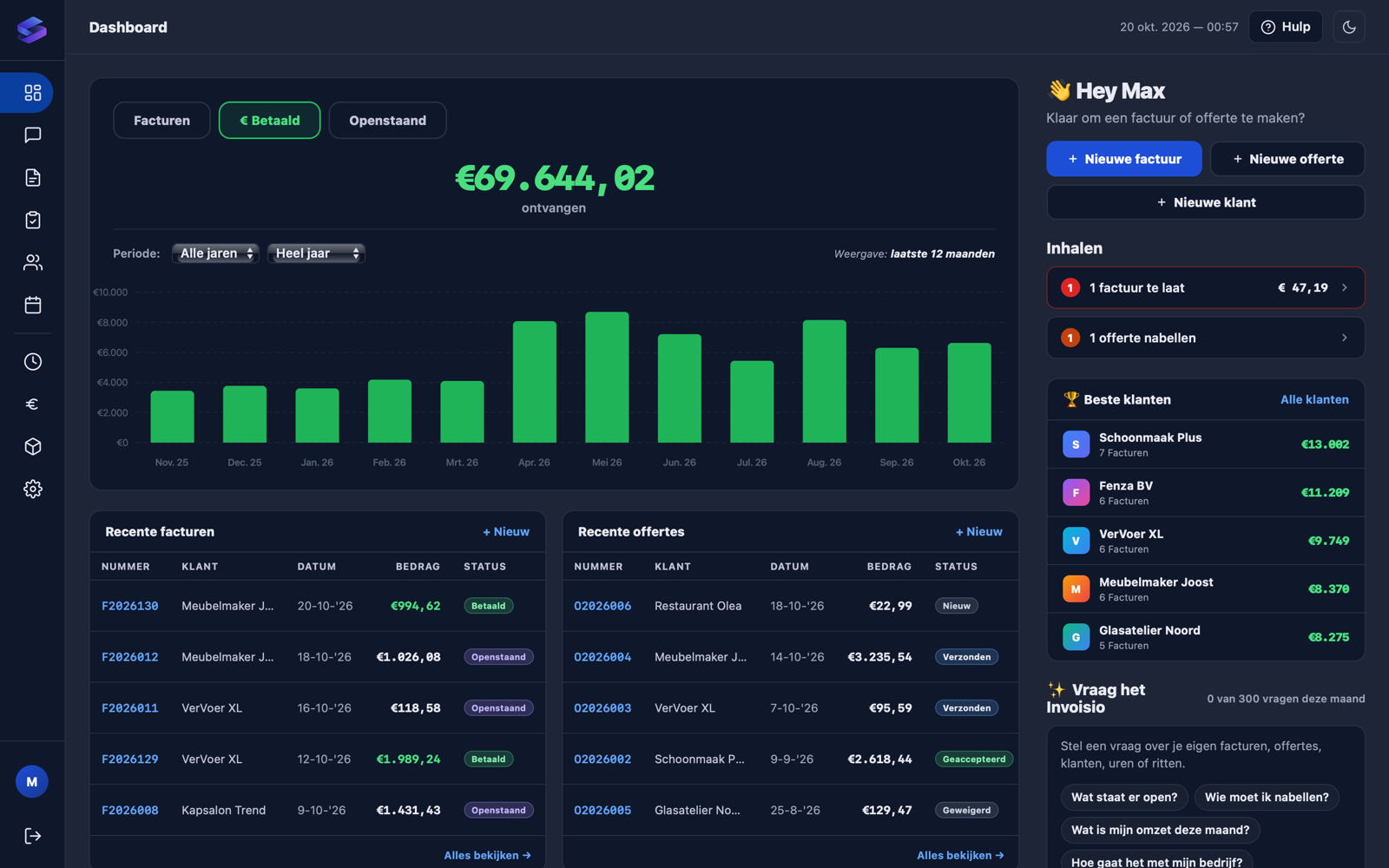
From quote to paid.
Quotes your client signs online. Invoices in your own branding, with a pay button for iDEAL and cards. Invoisio keeps track of who has paid, on the go in the app too.
- No credit card needed
- Prices include VAT
- 0% fee on online payments
- iDEAL and cards via Stripe
- E-invoice (UBL)
- App for iPhone and Android
- Shopify and WooCommerce
- Made in the Netherlands
One line, from quote to bookkeeping.
No more separate tools. What your client signs becomes your invoice. What they pay, you see right away.
Your client signs online
Send a quote with a link. Your client reviews and signs it, without an account or password.
An invoice in one click
Signed? Turn the quote into an invoice in your own branding. Invoisio works out the number and VAT.
Paying takes one tap
Every invoice has a pay button for iDEAL and cards. Paid? The status updates by itself.
Ready for your tax return
Reminders go out by themselves. Your VAT overview and the export for your accountant are ready.
Your own invoice, down to the pixel
Place blocks wherever you like and choose your colours and font. What you see in the editor is exactly what ends up in the PDF.
Read more →Reminders that send themselves
Three days before the due date a friendly reminder goes out automatically. Overdue notices after 3, 14 and 30 days are yours to switch on.
Read more →Hours and mileage, no lists
Start the clock when you begin. Track your mileage for tax deductions, and put hours on an invoice with one tap.
Read more →Receipts: snap and done
Take a photo of your receipt and save it with your expenses. No more shoebox at the end of the quarter.
Read more →E-invoice (UBL)
Every invoice also as an e-invoice (UBL, Peppol format), ready to import into accounting software. In every plan.
Read more →Webshop and API
Connect Shopify or WooCommerce: a paid order automatically becomes a paid invoice. Or build your own with our API. In Business and Enterprise.
Read more →Your admin in your pocket.
-
1 / 7
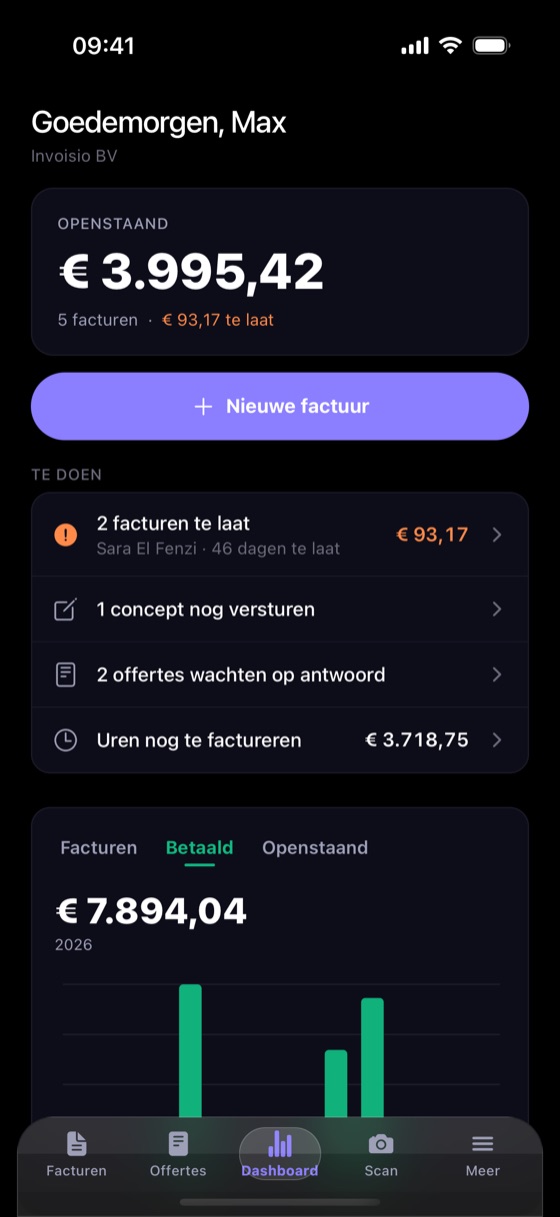
Open the app: your dashboard
At the top you see how much is still outstanding and how much is overdue. Under To do you find what needs attention: overdue invoices, drafts still to send and quotes waiting for an answer. Tap one and you are there.
-
2 / 7
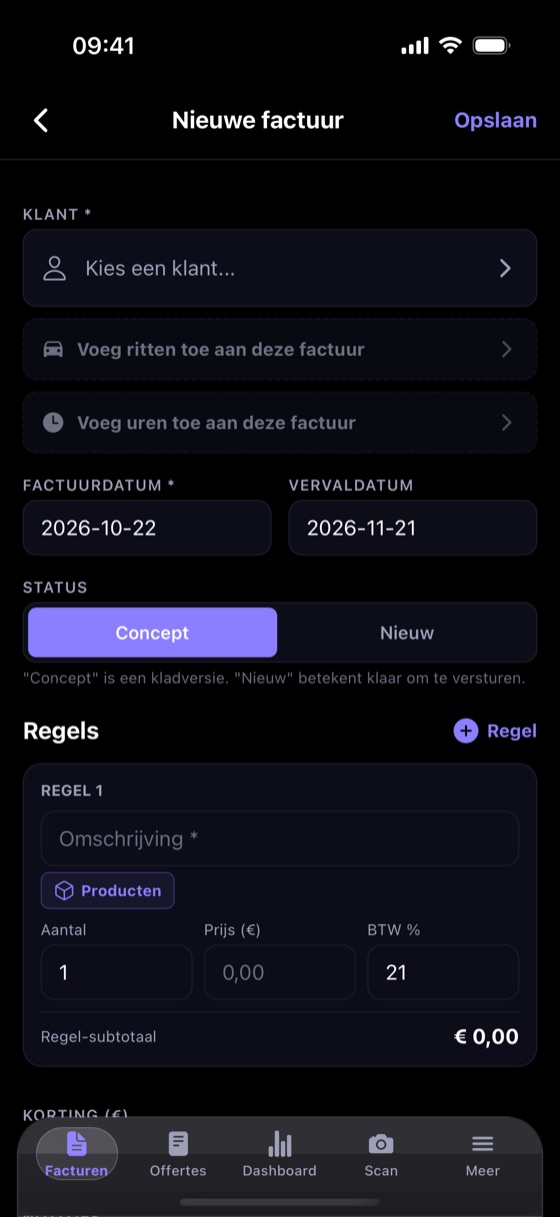
Create an invoice
Tap New invoice and pick a client. Fill in the lines or choose a product, and save. Add the hours you worked and the trips you drove with one tap.
-
3 / 7
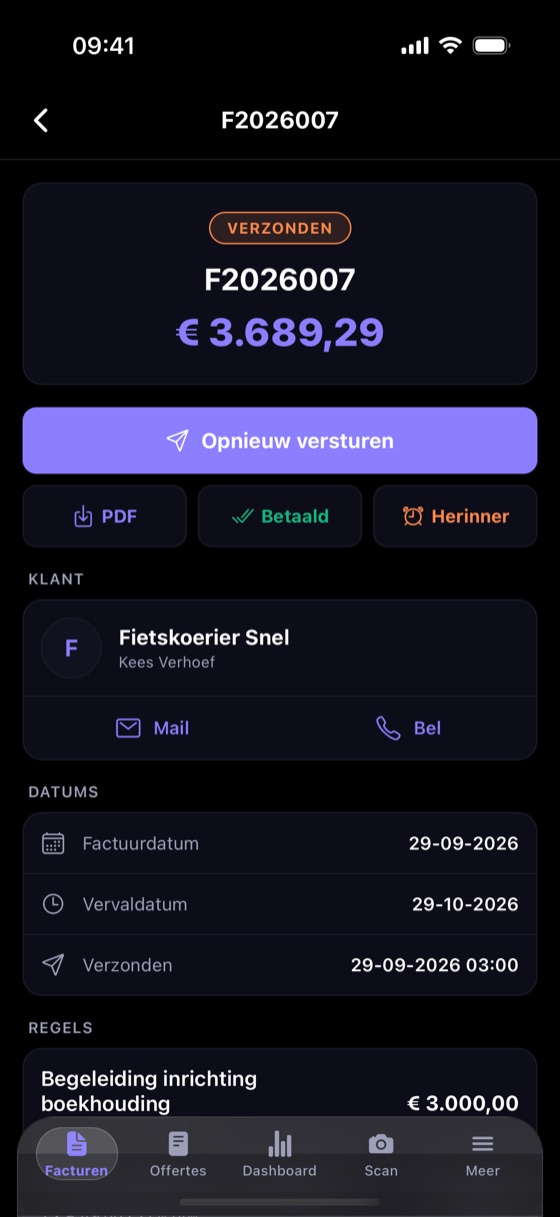
Send it and follow up
Tap Send: your client receives the invoice by email, with the PDF attached. Not paid on time? Send a reminder. Once it is paid, mark it as Paid.
-
4 / 7
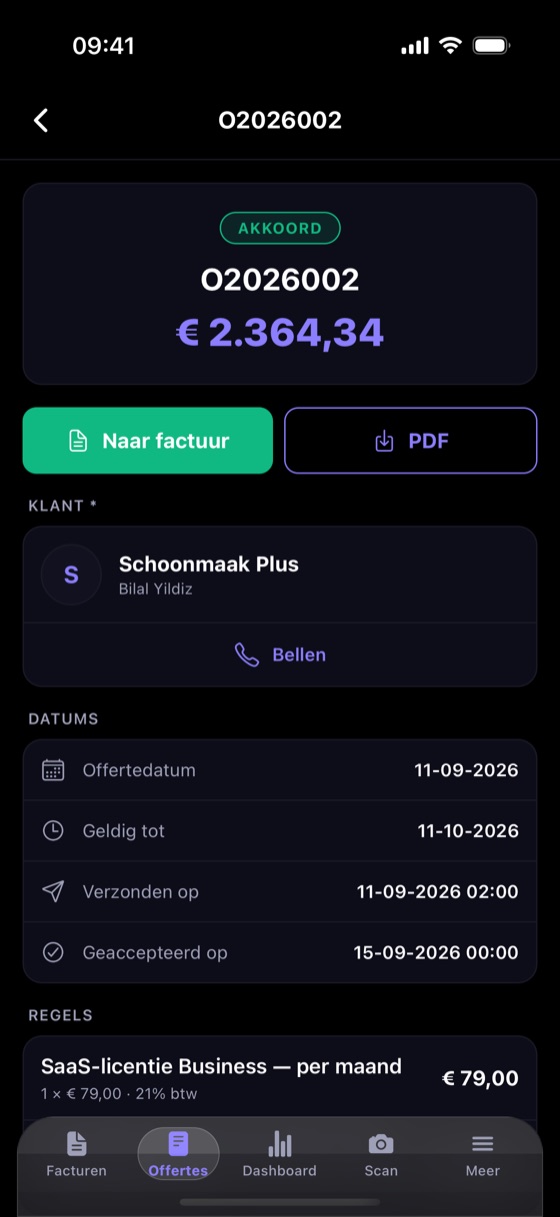
Quote accepted? Turn it into an invoice
You create and send a quote the same way. Your client says yes via the link in the email, and the quote shows Accepted. Tap To invoice and you have the invoice right away, with the same lines.
-
5 / 7
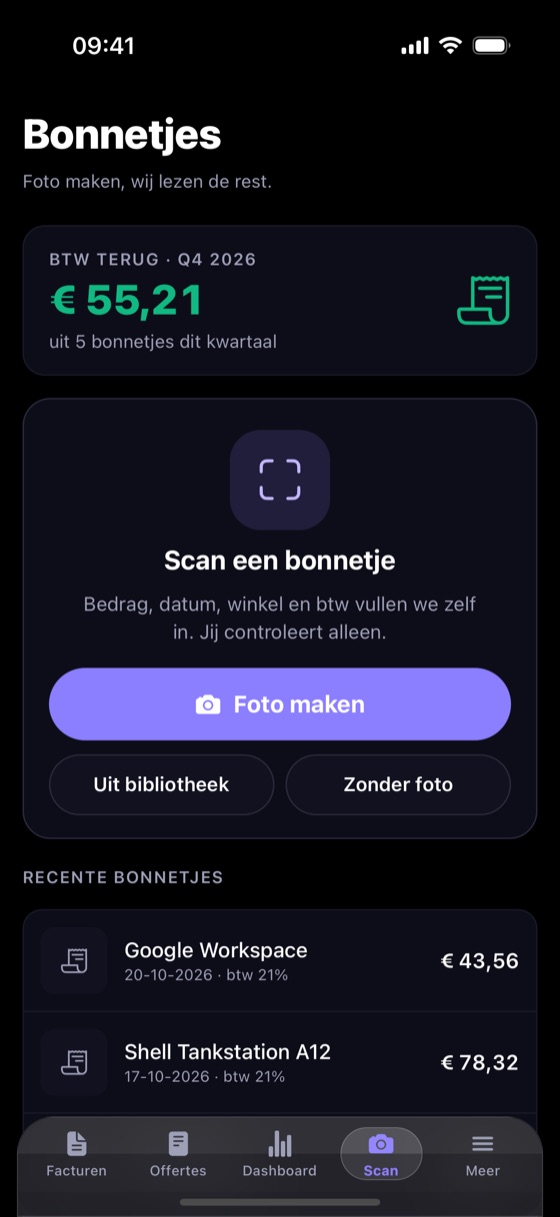
Scan your receipts
Take a photo of your receipt. We fill in the amount, date, shop and VAT; you only check. At the top you see how much VAT you can reclaim this quarter.
-
6 / 7
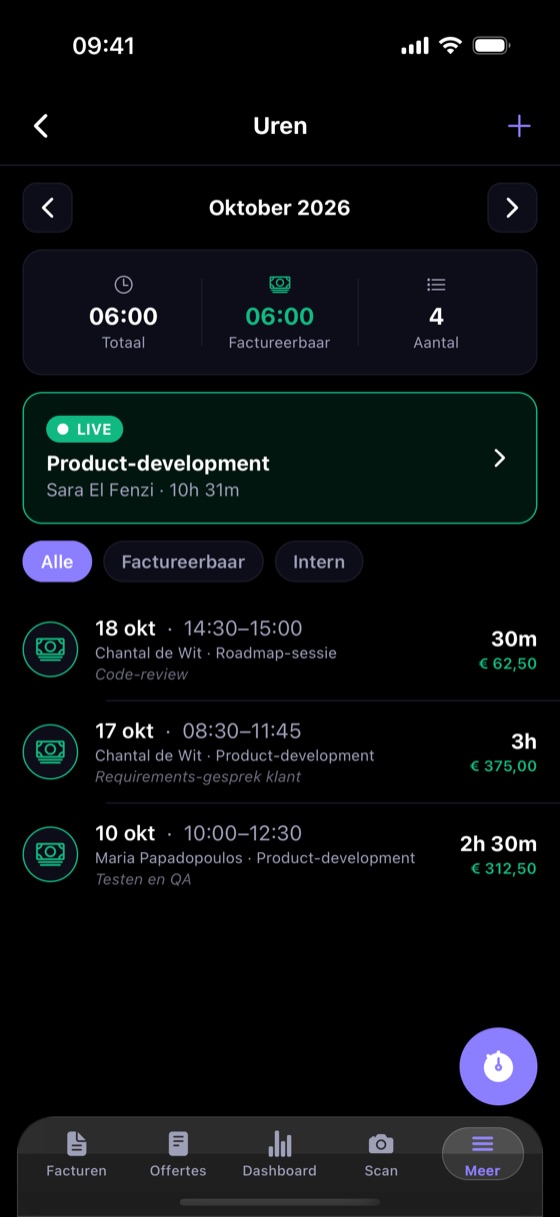
Track your hours and trips
Start the timer when you begin, or enter your hours afterwards. Trips work the same way. Whatever is billable, you add to your next invoice.
-
7 / 7
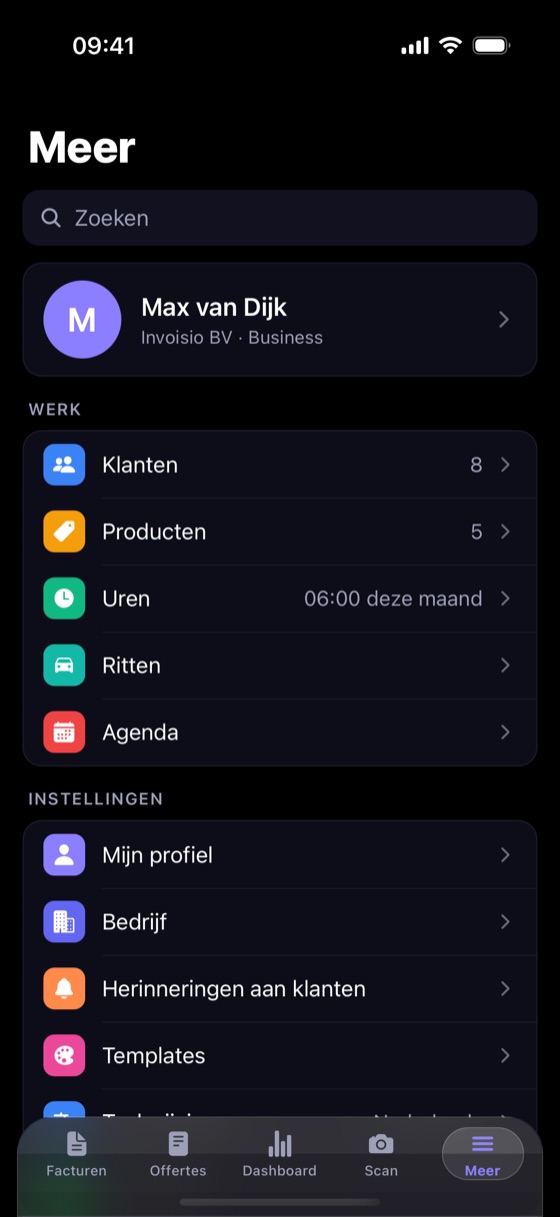
Everything else is under More
Under More you find your clients, products, hours, trips and calendar. And your settings: your company with logo and IBAN, client reminders and the template of your invoices.
Transparent pricing, no surprises.
All plans include a 30-day free trial. No credit card required.
- 4 invoices / month
- 4 quotes / month
- Calendar
- Mileage tracking
- Time tracking
- Bank connection
- Credit notes
- Product management
- Online payments (Stripe)
- Online payments: 0% — only Stripe's own rate
- Branded PDF invoices
- Sending by email
- E-invoice (UBL)
- No team members
- No AI assistant
- No recurring invoices
- No API access
- 30 days free trial
- 50 invoices / month
- 50 quotes / month
- 1 team member
- Calendar
- Mileage tracking
- Time tracking
- Bank connection
- Recurring invoices
- Credit notes
- Product management
- Online payments (Stripe)
- Online payments: 0% — only Stripe's own rate
- Import invoices
- AI Assistant
- E-invoice (UBL)
- No API access
- 30 days free trial
- 150 invoices / month
- 150 quotes / month
- 3 team members
- Calendar
- Mileage tracking
- Time tracking
- Bank connection
- Recurring invoices
- Credit notes
- Product management
- Online payments (Stripe)
- Online payments: 0% — only Stripe's own rate
- Import invoices
- AI Assistant
- Custom API access
- E-invoice (UBL)
- 30 days free trial
- Unlimited invoices
- Unlimited quotes
- Unlimited team members
- Calendar
- Mileage tracking
- Time tracking
- Bank connection
- Recurring invoices
- Credit notes
- Product management
- Online payments (Stripe)
- Online payments: 0% — only Stripe's own rate
- Import invoices
- AI Assistant
- Custom API access
- E-invoice (UBL)
- Dedicated support
- 30 days free trial
All prices include VAT.
Frequently asked questions
No credit card required. Start directly and only pay when you're convinced.
After 30 days you choose a plan or stop — all your data is always preserved.
Yes, at any time. Your account stays active until the end of your current billing period.
iDEAL, credit card (Visa/Mastercard) and SEPA Direct Debit — all via Stripe, secure and GDPR compliant.
Yes. Upgrades take effect immediately, downgrades apply after your current billing period.
Yes, with roles like admin, accountant or employee. Everyone gets exactly the right access.
Via Stripe you receive payments from clients via iDEAL, credit card and more. Connecting takes just a few minutes — fully automated.
Share your personal link and receive 20% recurring commission on every paying customer who signs up through you.
Accountant Marketplace
Find a reliable accountant near you. Compare profiles, read reviews and get in touch directly — free of charge.
Ready to invoice professionally?
Your first invoice is ready in minutes. 30 days free, no credit card needed.
Start 30 days free